

Meetings Licensing & Staff Seats
Enable Meetings for your workspace, understand why host licences follow the Admin and Instructor roles automatically, and buy an extra staff seat when every slot on your plan is taken.
Meetings Licensing & Staff Seats
Everyone in your workspace can join a meeting. Hosting one — starting a session, scheduling, running a webinar — needs a host licence, and licences are not something you hand out. They follow the Admin and Instructor roles automatically.
This page covers enabling Meetings and managing the ceiling on how many hosts you can have. For running sessions themselves, see Live Meetings and Webinars.
Enabling Meetings
Meetings is available on the Growth plan and above. Go to Settings → Meetings and click Enable Meetings.
On a plan below Growth the section explains the requirement and the Enable button is unavailable — there is nothing to try. See Billing to change plan.
Enabling does two things at once: it provisions Meetings for your workspace, and it immediately licenses everybody who already holds Admin or Instructor. Nobody has to be added by hand.
Licences follow roles
This is the part worth internalising, because it is the answer to almost every question about who can host:
Anyone holding Admin or Instructor gets a host licence. Everyone else can attend but not host.
There is no separate list of hosts to maintain, and no way to license somebody without giving them one of those roles.
| Role | Can join | Can host |
|---|---|---|
| Admin | Yes | Yes |
| Instructor | Yes | Yes |
| Learner | Yes | No |
| Owner (only) | Yes | No |
Owner on its own does not grant hosting. Owner is an ownership and billing role, not a teaching one, so it is deliberately not a host role. If your Owner account also needs to run sessions, give it the Admin role as well — most Owner accounts already have it.
Change who can host by changing their role. Grant Instructor and the licence appears within seconds; remove it and the licence is withdrawn the same way. The Licensed hosts table on the Meetings page is therefore read-only — it reports the consequence of your role assignments rather than being a thing you edit.
Removing somebody's host licence does not touch meetings they have already scheduled. Those sessions remain, and remain joinable — losing the ability to start new ones does not delete their calendar.
When a newly licensed host still sees no controls
Host eligibility is carried in the sign-in session, so somebody promoted while already signed in may not see the hosting controls immediately. Signing out and back in picks it up at once. Left alone, an open session refreshes on its own, but that can take up to an hour.
The licence ceiling is your role allowance
Because a licence is an Admin or Instructor role, the number of hosts you can have is the number of those roles your plan allows. There is no separate Meetings seat to buy.
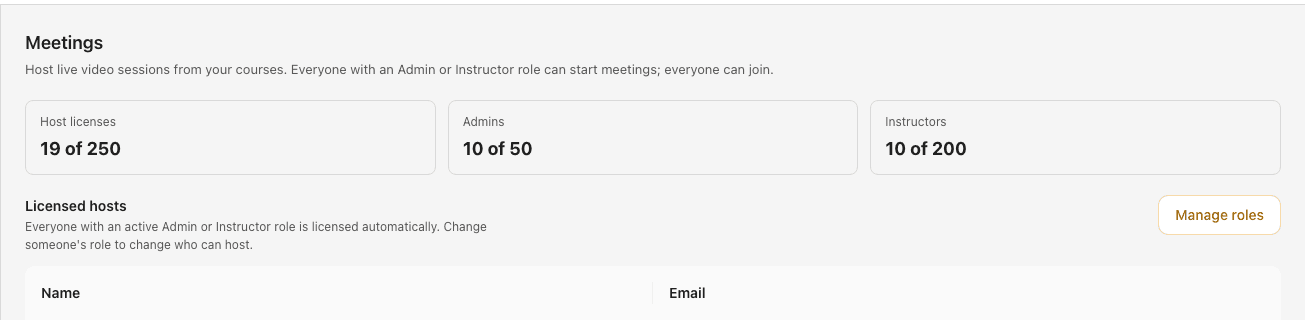
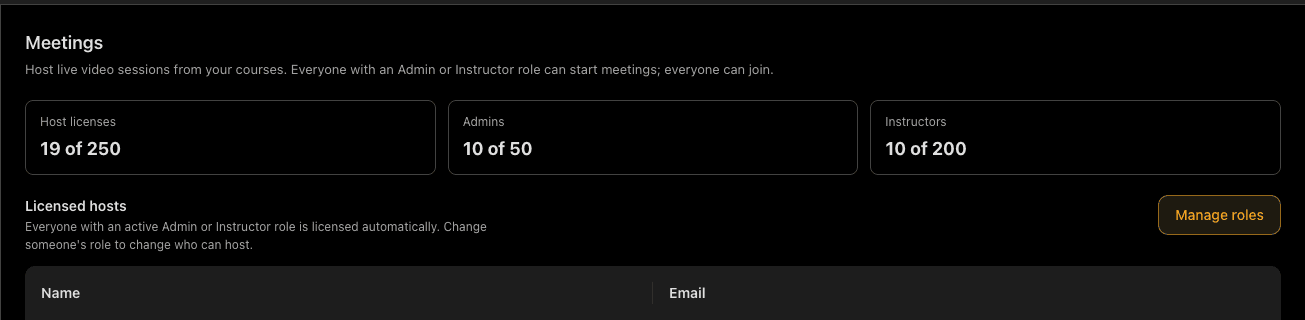
The Meetings page shows three tiles:
| Tile | Meaning |
|---|---|
| Host licences | Licences currently held, against the total allowance |
| Admins | Admin roles used, against the Admin limit |
| Instructors | Instructor roles used, against the Instructor limit |
The limits shown are effective limits: your plan's allowance plus any extra staff seats you have bought.
When every slot is taken
With both limits reached you will see All host licences are in use. The next Admin or Instructor grant is refused with a message naming the limit. Two ways forward: move up a plan, or buy a single extra staff seat.
Trying to add an admin beyond your limit is refused at the point of assigning the role, with an explanation of which limit you hit. It is not a silent failure — but it does mean the refusal appears on the Users page rather than on the Meetings page, which is where the count that caused it is displayed.
Extra staff seats
An extra staff seat raises one role's ceiling by one. Buy an admin seat and your Admin limit goes up by one, so you can grant one more Admin role — which in turn gets one more host licence.
From Settings → Meetings:
- Click Add a seat. The dialog shows the price.
- Choose whether the seat raises the Admin or the Instructor limit.
- Confirm.
The charge is added to your current subscription and prorated immediately, so you pay for the remainder of this billing period now and the full amount from the next one. The limit rises straight away — no waiting for a renewal.
Releasing a seat
The Extra staff seats row lists the seats you own, each with Release.
Releasing removes the seat now, and you continue to be billed for it until the end of the current billing period, with no charge afterwards. That is the normal shape for a downgrade: you keep what you paid for until the period you paid for ends.
A seat cannot be released while it is occupied. If releasing it would leave more people holding the role than your allowance permits, the release is refused and tells you how many are using the current allowance. Remove a role first, then release the seat.
Seats are not available on every plan or in every currency. Where they are not, the page says why rather than offering a button that fails — for example on a custom plan, where limits are managed by Arythmatic support and the right move is to contact us.
If your plan changes
Dropping below Growth suspends Meetings. Hosts cannot start sessions, and the page says so.
Suspension freezes licences rather than deleting them. Upgrade back to Growth or above and every licence returns exactly as it was — you do not rebuild anything. The same applies if the workspace itself is suspended for a billing problem: resolving the billing restores hosting.
If the numbers look wrong
Your role assignments are the source of truth, and the licence set is reconciled against them nightly. So a licence that looks out of step with somebody's roles — after an unusually busy day of role changes, say — corrects itself without intervention.
If it still looks wrong after that, the useful detail when you contact support is whether a reload changed anything: a stale view that a reload fixes is a different fault from a licence that genuinely was not granted.
Grandfathered workspaces
If you were hosting meetings before licensing was introduced, every host you had was carried over, including any workspace already over its plan's role allowance. Nobody lost access.
Where a workspace is over its allowance, the Meetings page says so plainly. Existing roles and their licences are kept; only further Admin or Instructor grants are refused until you raise the limit with a plan change or an extra seat.
Next
- Live Meetings — scheduling and running sessions inside a course.
- Webinars — standalone sessions people register for.
- Roles — the roles that carry a host licence.
- Billing — plans, allowances and changing plan.
Webinars
Run standalone live sessions that people register for — create and publish a webinar, take registrations with or without approval, go live, and understand why a published webinar is called "scheduled".
Template Marketplace
Browse ready-made quiz templates, unlock access for your organization, and manage the templates you own.
