

Certificates for Offline Attendees
Issue and email certificates to people who attended a session outside the LMS — upload the attendee list as a CSV, pick a template, and get a report of who was issued and who was not.
Certificates for Offline Attendees
You ran a session that did not happen in Arythmatic — a college masterclass, a corporate workshop, a conference track — and afterwards you hold nothing but a list of attendees. This turns that list into issued, emailed, verifiable certificates.
The attendees do not need accounts, do not need to have enrolled in anything, and do not count against your plan.
Before you start
You need a certificate template. The workspace default is used unless you choose another — see Certificate templates.
Preparing the CSV
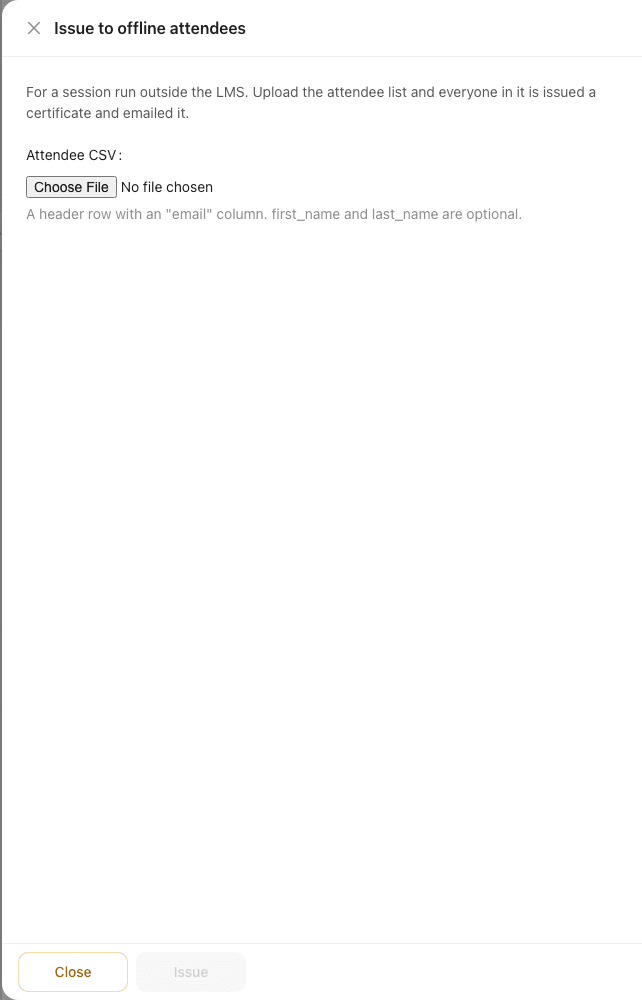
One row per attendee. Only an email address is required.
Headers are matched case-insensitively and several spellings are accepted, so an export from another system usually works untouched:
| Column | Accepted headers | Required |
|---|---|---|
email, email address, e-mail | Yes | |
| First name | first_name, first name, firstname, given name | No |
| Last name | last_name, last name, lastname, surname, family name | No |
| Full name | name, full name, full_name | No |
Give either a full name or a first/last pair — whichever your source system produces.
email,first name,last name
asha@example.com,Asha,Patel
j.okafor@example.com,Joseph,Okafor
A file may contain up to 2,000 rows.
The name in the CSV is the name printed on the certificate. If a row has no name, the part of the email address before the @ is used so the certificate is never blank — which is legible but rarely what you would choose. For anything a recipient will show an employer, supply real names.
Issuing
- Go to Credentials and choose Issue to offline attendees.
- Upload the attendee CSV.
- Optionally pick a certificate template; leave it empty to use the workspace default.
- Enter a session name — this identifies the session on the credential, so make it specific: AI Masterclass — 10 Sep 2026, not Workshop.
- Issue.
Each certificate is rendered and emailed to the attendee as it is issued.
The session name is how repeat runs are recognised. Issuing the same list again under the same session name returns the certificates that already exist instead of creating duplicates — so a partially-failed upload can safely be re-run with the same file and name. Change the name and you have described a different session, and everybody gets a second certificate.
Reading the result
Every row is issued independently, so one bad address never costs the rest of the file. When the run finishes you get a breakdown:
| Outcome | Meaning |
|---|---|
| Issued | A certificate was created and emailed |
| Already held | This person already has a certificate for this session name — nothing was sent again |
| Not issued | The row could not be processed, with the reason |
Already held is reported separately from issued on purpose: a re-run of a 200-row file reports 200 already held rather than 200 freshly issued, so the number you see is what actually went out.
Use Download CSV on the not-issued list to get those rows back as a file — fix the addresses and upload just that file, under the same session name.
What the attendee gets
An email with their certificate, and a public credential page they can share or an employer can verify — the same page and the same verification as a certificate earned by completing a course. See Verifying & sharing.
What gets created behind the scenes
Issuing a certificate requires a recipient record, so a user row is created for each attendee. It is worth knowing exactly what that row is and is not:
- It has no role and no enrolment.
- It does not consume a seat on your plan. Your plan counts enrolled learners, and these rows have no enrolment. They begin to count only if the person later enrols on a course and becomes a real learner.
- It cannot sign in. No login identity is created, so the row grants no access to your workspace.
- It is claimable. If that person later signs in with the same email address, the existing row is adopted — so their certificate is already on the account rather than stranded on a duplicate.
That last point is the reason to get email addresses right rather than approximate. A certificate issued to asha@exmaple.com is not wrong so much as unreachable: it will never join up with Asha's real account if she enrols later.
Correcting a name
Re-upload the same file, with the name fixed, under the same session name. A certificate that has not finished rendering picks up the corrected name.
A certificate that has already been rendered and emailed is not re-rendered by a re-upload. If the wrong name has already gone out, revoke that credential and issue again under a new session name — see Issued credentials.
Next
- Issuing certificates — the normal, completion-driven path.
- Certificate templates — design what is printed.
- Issued credentials — find, re-send and revoke what you have issued.
Issuing Certificates
How Arythmatic decides when a certificate is earned, which template design a learner receives, and how admins issue or force-issue credentials manually or in bulk.
Managing Issued Credentials
View, search, and filter every certificate your workspace has issued, and understand what revocation does — including the storage and CDN artifacts it permanently deletes.
